Client-Facing Conversational AI over TCM (API)
Sudarshantech Software's API offers client-side conversations with AI over compliance-statuses, allowing:
- Clients to hold prompt, natural and automated discussions over their compliance deadlines, dates and other tracking information - with details pulled directly from the TCM platform.
- A small compliance team can automate hundreds to thousands of client-interactions per day without needing to budget direct human-interaction on each enquiry.
- Sudarshantecsh's API provides these automated tracking conversations regarding compliance without divulging any internal team-related information, or any information marked as confidential on TCM - allowing service-providers to choose which information is shared automatedly and which requires human-interaction.
- Additionally, we provide an API-Control Dahboard, that allows a compliance-team to monitor converstions between AI and their clients, enable or disable AI-responses, change response styles at any time, and add or remove user accounts.

Login to the API Dashboard
API Development & Usage
Sudarshantech's API exposes simple HTTPS endpoints that allow client-facing apps to be developed in a variety of formats downstream, based on client preference - including mobile, desktop, browser applications, etc, or allowing ai-conversations over TCM to be baked into or embedded within existing client-applications with very little code.
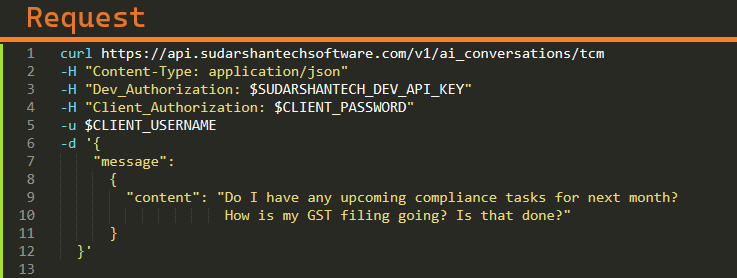
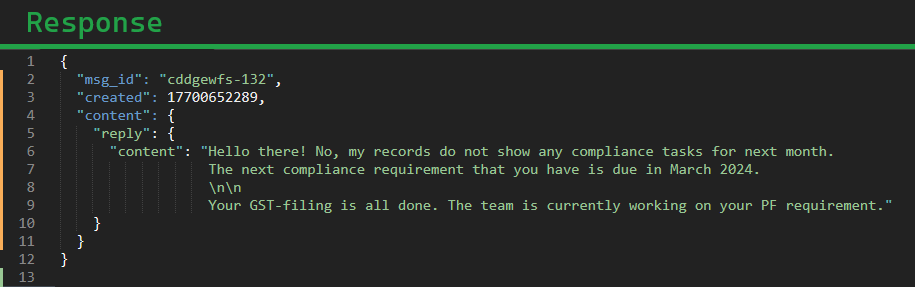
An example of an API request and response is shown below, where a client raises a query on his compliance tasks due for the next month and attempts to track his GST filing. This request is handled and replied to in a natural way by Sudarshantech's AI. Note that the information in the response is pulled directly from the TCM platform - based on entries that are made by the compliance team.
Each compliance service provider using Sudarshantech is given a unique SUDARSHANTECH_DEV_API_KEY that allows them access to Sudarshantech's API, and each of their clients has a unique CLIENT_USERNAME and CLIENT_PASSWORD that allows them to raise queries on their compliance informaiton within TCM.
Note that a single client can only query and track their own statuses using the API, with no access to information of other accounts handled by the same compliance service provider. In turn, a single compliance service provider can only serve information on their own clients, with no access to information belonging to other service providers using Sudarshantech.
API Control Dashboard
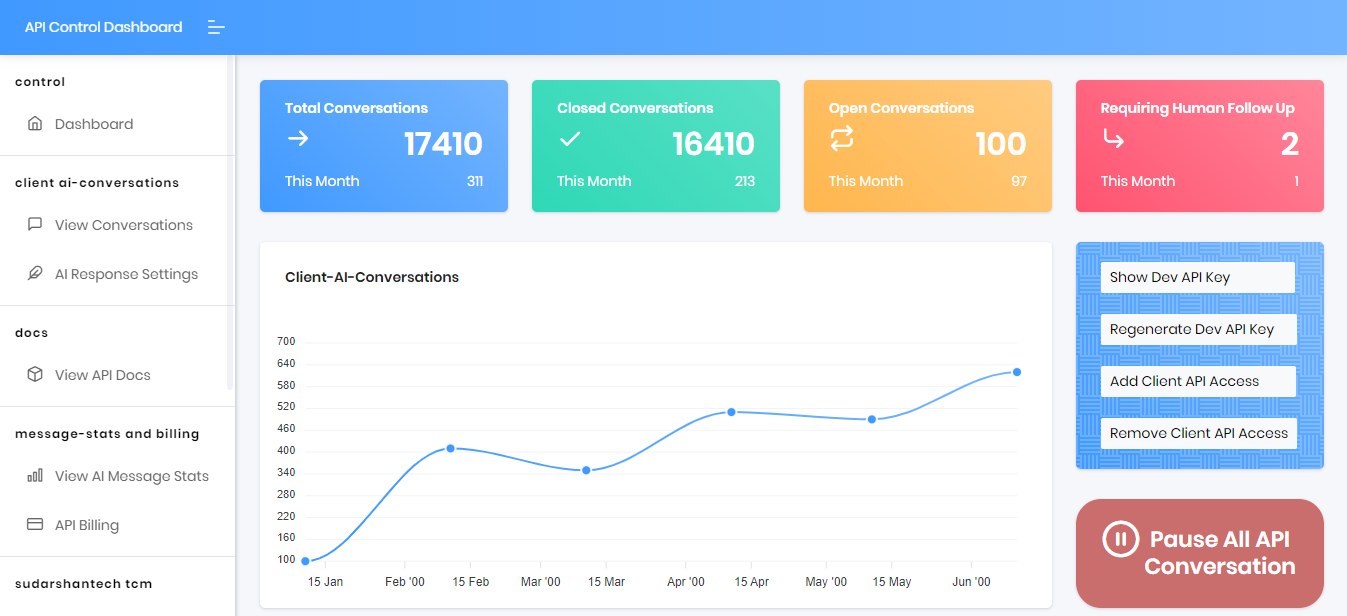
Sudarshantech's API comes with a control-dashboard that can be used to monitor usage metrics, view documentation, and view conversations - while providing easy access to messages that require human follow-up. Functional features include the ability to set ai-response styles, reset Dev API Keys, add and remove client API Access, and the ability to pause and resume API responses at anytime.
Using this control-dashboard in conjunction with TCM makes it easy to keep track of client-experiences and monitor engagement.
Client-Facing Conversational AI over TCM (API)
Sudarshantech Software's API offers client-side conversations with AI over compliance-statuses, allowing:
- Clients to hold prompt, natural and automated discussions over their compliance deadlines, dates and other tracking information - with details pulled directly from the TCM platform.
- A small compliance team can automate hundreds to thousands of client-interactions per day without needing to budget direct human-interaction on each enquiry.
- Sudarshantecsh's API provides these automated tracking conversations regarding compliance without divulging any internal team-related information, or any information marked as confidential on TCM - allowing service-providers to choose which information is shared automatedly and which requires human-interaction.
- Additionally, we provide an API-Control Dahboard, that allows a compliance-team to monitor converstions between AI and their clients, enable or disable AI-responses, change response styles at any time, and add or remove user accounts.
Login to the API Dashboard
API Development & Usage
Sudarshantech's API exposes simple HTTPS endpoints that allow client-facing apps to be developed in a variety of formats downstream, based on client preference - including mobile, desktop, browser applications, etc, or allowing ai-conversations over TCM to be baked into or embedded within existing client-applications with very little code.
An example of an API request and response is shown below, where a client raises a query on his compliance tasks due for the next month and attempts to track his GST filing. This request is handled and replied to in a natural way by Sudarshantech's AI. Note that the information in the response is pulled directly from the TCM platform - based on entries that are made by the compliance team.
Each compliance service provider using Sudarshantech is given a unique SUDARSHANTECH_DEV_API_KEY that allows them access to Sudarshantech's API, and each of their clients has a unique CLIENT_USERNAME and CLIENT_PASSWORD that allows them to raise queries on their compliance informaiton within TCM.
Note that a single client can only query and track their own statuses using the API, with no access to information of other accounts handled by the same compliance service provider. In turn, a single compliance service provider can only serve information on their own clients, with no access to information belonging to other service providers using Sudarshantech.
API Control Dashboard
Sudarshantech's API comes with a control-dashboard that can be used to monitor usage metrics, view documentation, and view conversations - while providing easy access to messages that require human follow-up. Functional features include the ability to set ai-response styles, reset Dev API Keys, add and remove client API Access, and the ability to pause and resume API responses at anytime.
Using this control-dashboard in conjunction with TCM makes it easy to keep track of client-experiences and monitor engagement.